
Stuck on Profile Perfect clues that seem useless? Learn how to translate plain sentences into safe grid cells using Room, Building, and Cave examples.


Guide By Liam Stone
Published on July 6, 2026
Liam Stone has played Profile Perfect since the app first launched on the Apple App Store. He spotted its potential early, and that early bet turned into hundreds of hours spent solving levels, testing clue logic, and documenting answers for other players. Liam runs the YouTube channel Puzzle Game Answer where his puzzle walkthroughs have earned over 935,000 views and a growing community of more than 800 subscribers. He covers a wide range of mobile puzzle games beyond Profile Perfect, giving him firsthand experience with how these games design clues, structure levels, and trip up even experienced players. Every guide on this site reflects that hands on experience. Liam plays each level himself, verifies every answer against the in game grid, and rewrites confusing clues into plain language so you don't need to guess. If you want more of his walkthroughs, subscribe to his channel.
Loading calendar...
You read the clue twice. Then a third time. It talks about groceries, or tools, or something washing up on a shore, and none of it sounds like a name, a color, or a job title. Your grid sits there empty and the clue sits there useless.
Except it isn't useless. In Profile Perfect, a lot of clues hide direct logic behind everyday language. Once you learn to spot the pattern, these "useless" lines turn into the fastest points you'll score all game.
Profile Perfect likes to dress up simple facts as little scenes. Instead of telling you a room's type outright, it describes what happens inside that room. Instead of naming a building, it describes what you'd do there. This makes the puzzle feel more like an investigation and less like a spreadsheet, but it also means you have to do a small translation step before the clue means anything on the grid.
Here's the thing to remember. Every clue, no matter how wordy, is pointing at one subject and one trait. Your job is to strip out the story and land on the plain answer underneath.
This is the habit that fixes almost every stuck moment. Take the sentence, ask which subject it's about, ask which trait it's describing, then write down the value. That's it. You translate the sentence into a cell, and the clue stops feeling like a riddle.
When I solved the room level early in the game, one clue read "tools to make food can be found in Room B." Nothing in that sentence says kitchen. But think about what the sentence is really doing. It's describing the room's type by describing what's inside it. Food tools live in a kitchen, so Room B's type becomes Kitchen. One sentence, one cell, done.
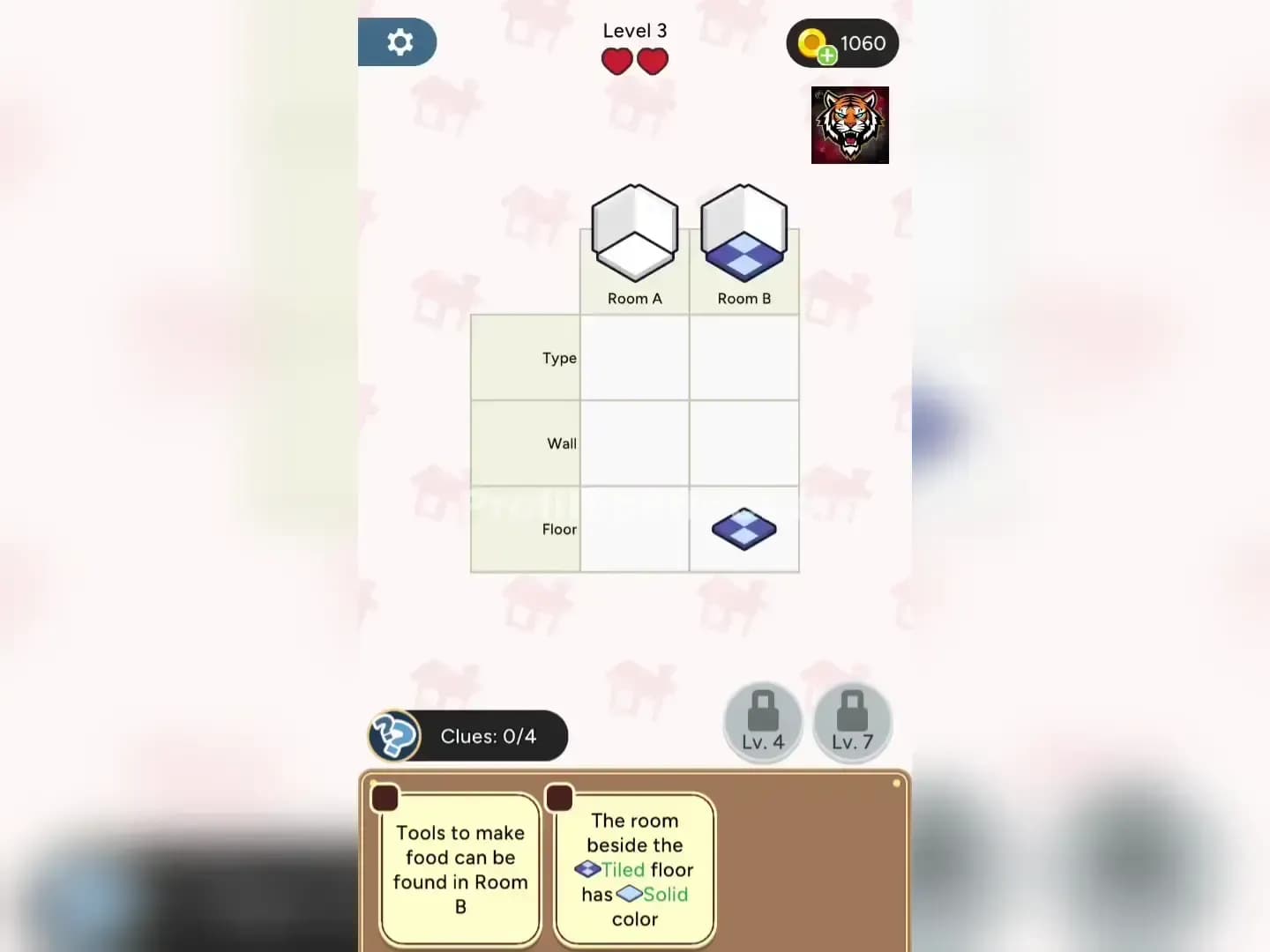
The rest of that puzzle then falls into place through position. The clue about the room beside the tiled floor tells you Room A's floor is solid, and the clue about the room next to the kitchen being where people sleep gives you Room A's type as Bedroom. None of it needed a guess. It only needed a translation.
The building level plays the same trick. One clue says "Building B is a great place to buy groceries." Again, no store name, no direct label. But groceries mean a supermarket, so Building B's type becomes Supermarket. That single cell then unlocks the rest of the row. A later clue puts a hospital to the left of the supermarket, which gives you Building A's type. Another clue ties a no smoking sign to the rightmost building, which points straight at Building C.
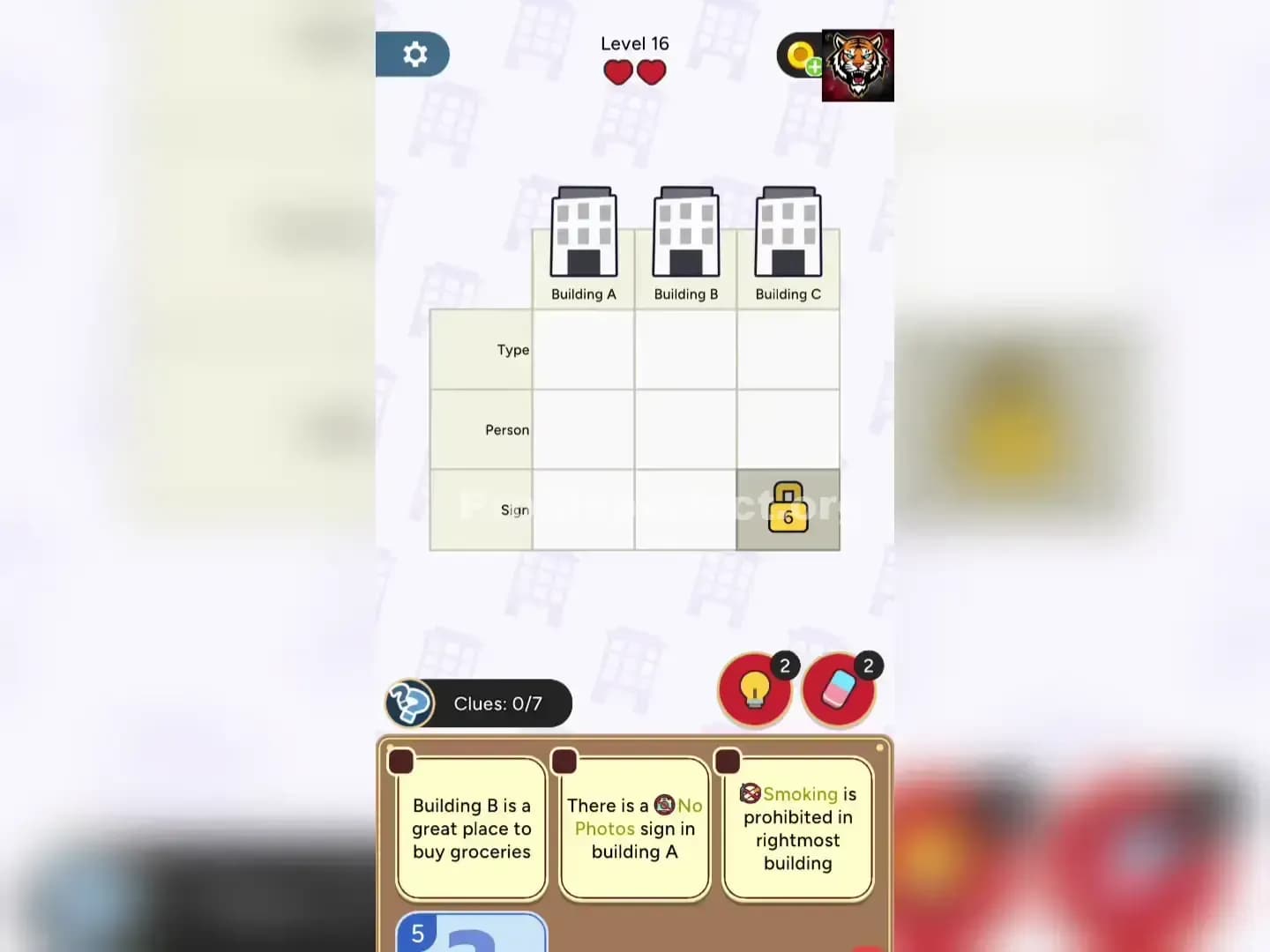
Once you see the pattern, you start reading every wordy clue and asking yourself, "what plain fact is this describing?" That question alone clears out most of the fog.
Translating the sentence only helps if you know where to put the answer. Before you tap anything, check your trait list. A puzzle with Type, Discovery, and Inhabitant as traits is telling you exactly what kind of answers to expect. If a clue mentions a location detail, it belongs under Type. If it mentions an item someone found, it belongs under Discovery. Match the clue's content to the matching column first, then commit the tap.
The cave level shows this well. One clue says "Cave A is a Sea Cave found along the coastline." The coastline detail is just flavor text confirming what the sentence already told you directly, that Cave A's type is Sea Cave. But later clues get subtler. "Olivine is a mineral found in cave made from dried up lava" is really talking about Cave C's type and Cave C's discovery at the same time, since dried up lava means a lava tube. The sentence carries two answers if you know to look for both.

This is why checking your trait columns first matters. If you rush to fill in a cell before confirming the category, you risk placing a correct value in the wrong trait, and that costs you a life you didn't need to lose.
Never tap the moment you think you've cracked a clue. Check it against a second clue if one exists. In the cave level, the clue about the lava tube not being nearest the sea confirms what you already worked out about Cave A and Cave C, so you know your translation was right before you touch the grid. In the building level, the clue about a son standing next to the building with the no photos sign backs up the placement you already made for Building A and Building B.
Verification takes a few seconds. A wrong tap costs a life. That trade is always worth making.
If a clue truly won't budge after you've translated it and checked the trait list, move on to a clue you can solve and come back later. Fresh placements often unlock the stubborn one through simple elimination, since a trait with only one open slot left has to take whatever value remains. Use a booster only after you've genuinely tried the translation step, since the habit of turning sentences into cells is what makes every later level faster, not just this one.
The clues in Profile Perfect are never really useless. They're just written in plain language instead of grid language. Learn to hear the difference, and the board stops looking like a wall of text and starts looking like the answer key it always was.